







Muse from Meta review
 Analysis by GetAllApps
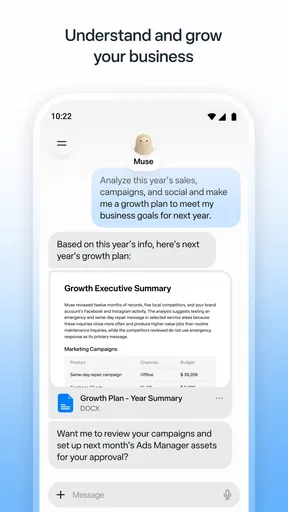
I would judge Muse less like a conventional productivity suite and more like a new kind of assistant: the useful question is not whether it replaces your calendar, notes, or task manager, but whether having a personal AI agent in your workflow makes everyday planning easier. That distinction matters. If you want a dependable place to store tasks and check them off, a traditional tool may feel more direct. If you want help turning a fuzzy request into a clearer next step, Muse is more compelling.
Meta Platforms, Inc. presents Muse as a productivity app, and its short store label is simply “Muse.” The app is free to download, rated Teen, and has a 4.7 average from around 115,000 ratings. It has passed five million installs, which suggests that many people are willing to try this AI-focused approach. Those figures are useful context, but they do not tell me whether it will suit your habits; the best test is whether you have recurring work that benefits from asking for help rather than merely entering information.
What should decide whether Muse belongs in your routine?
Start with the kind of friction you want to remove. If you often know the outcome you want but struggle to break it into manageable steps, an AI agent could be a more natural starting point than a blank task list. If your main need is a fixed record of appointments, deadlines, and notes, a conventional calendar or organizer may be easier to trust and faster to scan.
I would also consider how you like to work. Some people prefer structured forms, visible fields, and predictable controls. Others are comfortable describing a need in ordinary language and refining the result through conversation. Muse is aimed at the second group. The potential gain is less effort getting started; the trade-off is that generated help may need checking and editing before it is ready to use.
Privacy and precision should be part of that decision, too. An AI productivity app is not the place to paste sensitive work material casually or treat every response as authoritative. I recommend keeping requests focused, leaving out confidential details unless you have reviewed the app’s applicable privacy controls, and checking important dates, names, and commitments yourself. That is sensible practice for any AI assistant, but especially important when the output could shape your schedule or a message to someone else.
Where an AI-first workflow can save effort
The clearest reason to choose Muse is the possibility of moving from an intention to an organized plan without first deciding exactly how to format that plan. For example, you might be staring at a week of errands, a work deadline, and a family commitment. Instead of building a polished system first, you can frame the problem in plain terms and use the assistant to help clarify what needs attention. The practical value is not a magical answer; it is reducing the blank-page pause.
A useful way to get better results is to give the agent boundaries. Rather than asking it to “organize my week,” specify the outcome, the fixed commitments, and what you consider a realistic workload. Then review the result as a draft. This small change makes the interaction more actionable and makes it easier to spot assumptions that do not fit your life.
Another strong use is preparing for a task you keep postponing because it feels too large. I would ask for a first-pass sequence with a clear starting action, then choose which steps actually belong on my list. That is a better fit for an AI assistant than asking it to make every decision for me. The assistant can help reveal structure; I remain responsible for deciding what is feasible and important.
For a concrete everyday scenario, imagine you have to prepare for a meeting, handle a household errand, and make progress on a report before the end of the day. A helpful workflow is to describe the available time and the non-negotiable commitments, ask for a sensible order, and turn the answer into a short plan you can edit. The non-obvious benefit is that the prompt itself forces you to name constraints you might otherwise overlook. The limitation is equally real: if the plan is wrong about your priorities, you still need to correct it before acting.
I also see value in using Muse as a thinking partner for tasks that do not begin with a clean checklist. Drafting an outline, comparing possible approaches, or turning a vague project into questions to resolve can be less awkward in a conversational interface than in a blank notes page. I would treat these outputs as working material, not finished work. That distinction keeps the app useful without handing over judgment that should remain yours.
Its adoption and user response are encouraging but not decisive. Muse’s average rating is 4.7, and the app has around 19,000 written reviews. I take that as a sign of substantial interest, not proof that every workflow is reliable or that the app will match every user’s expectations. AI tools can feel excellent for one kind of request and less useful for another, so I would judge it by a few tasks you genuinely repeat rather than by a single impressive first interaction.
When a familiar alternative is the better tool
Compared with a standard task manager, Muse’s appeal is flexibility rather than a purely manual system. A task manager is often the better choice when you already know what must be done and want a clean, persistent list with minimal interpretation. It can also suit people who dislike conversational interfaces or want every item entered in a consistent structure. If that describes you, adding an AI layer may create more steps instead of fewer.
A notes app is still preferable when your priority is preserving your own wording, collecting reference material, or maintaining a personal archive. Muse’s assistant-oriented approach makes more sense when you want help working through information, not simply storing it. I would not replace a carefully maintained notebook just because an AI tool can summarize or reorganize ideas; the two serve different purposes, and your original notes may be the more trustworthy record.
Likewise, a calendar is the stronger choice for seeing fixed commitments at a glance. AI can help you think about how to approach a day, but a visual schedule remains a clearer home for appointments that must happen at specific times. For a dependable routine, I would keep the calendar as the source of truth and use Muse, if it fits, to think through preparation or follow-up. That division avoids confusing a suggested plan with a confirmed booking.
There is also a good reason to skip Muse if you want an assistant that makes decisions without supervision. I would not rely on any AI-generated plan as the final authority for an important deadline, a professional commitment, or a complicated personal schedule. Users who need strict repeatable workflows, established records, or highly predictable manual control may be happier with conventional productivity apps. Muse is most convincing when the cost of getting started is your main obstacle, not when you need an unquestionable source of truth.
What trying it may change—and what it will not
Because Muse is free to download, trying it does not require an upfront purchase. However, in-app purchases range from $0.99 to $1,049.00 per item, so I would check the purchase details in the app store before approving anything. The broad range makes it especially important not to assume every capability or usage level is included at no cost. Decide what you need first, then evaluate any purchase against that specific use rather than paying simply because an AI feature seems promising.
The version listed is 13.0.0.4.159, and the minimum operating-system requirement is 10. Before installing, check that your device meets that requirement. The app is intended for Teen users, so families should still make their own judgment about whether an AI productivity tool is appropriate for a particular young person and how it will be used.
The main cost of switching is not moving a complete library of information; it is changing the habit of how you begin a task. If you are accustomed to opening a list and entering an item, a conversational request can feel indirect at first. I would avoid migrating everything at once. Pick one recurring, low-stakes workflow—such as planning a busy day or outlining a personal project—and compare the time and effort with your current method over several uses.
That trial also answers an important question: does Muse give you useful momentum, or do you spend more time correcting its suggestions than you would have spent organizing the work yourself? Keep your existing calendar and task system in place while you test it. If the assistant consistently helps you move from uncertainty to a usable first draft, you can decide what role it deserves. If it mostly adds review work, there is no need to force it into your routine.
My recommendation
I recommend Muse to people who regularly face open-ended tasks and would welcome help turning them into a starting plan. It is a particularly sensible trial for someone who finds blank pages intimidating, enjoys working through requests in ordinary language, and is willing to check AI-generated suggestions. Meta Platforms, Inc. has positioned it in productivity, but its strongest case is as an assistant for thinking and organizing—not as a reason to abandon every tool that already keeps your life in order.
I would not choose it as my only planning system if I needed a highly structured record, a dependable visual calendar, or an entirely manual workflow. In those cases, a conventional task manager, notes app, or calendar is likely the better primary tool, with Muse at most serving as an occasional planning aid. That is not a weakness so much as a useful boundary: conversational assistance and reliable record-keeping are different jobs.
My practical advice is to begin with one real task, give the assistant clear constraints, and treat its response as a draft you own. If that makes the task easier to start and the result survives your review, Muse may earn a place in your routine. If you end up rewriting everything or prefer direct control, stick with the familiar alternative. The right reason to keep Muse is that it reduces your thinking friction—not simply that it uses AI.
Pros and cons
Pros
- Voice conversations offer a hands-free way to interact with the assistant.
- Image generation makes it easy to create visuals from text prompts.
- The app can answer questions using information from the web.
- A familiar social-style interface makes chats easy to browse.
- It is free to download and use in supported regions.
Cons
- Some features may not be available in every country.
- AI responses can be inaccurate or out of date.
- Generated images may not match the prompt precisely.
- The app collects data under Meta's privacy practices.
- Some answers may reflect bias or produce inappropriate content.


